
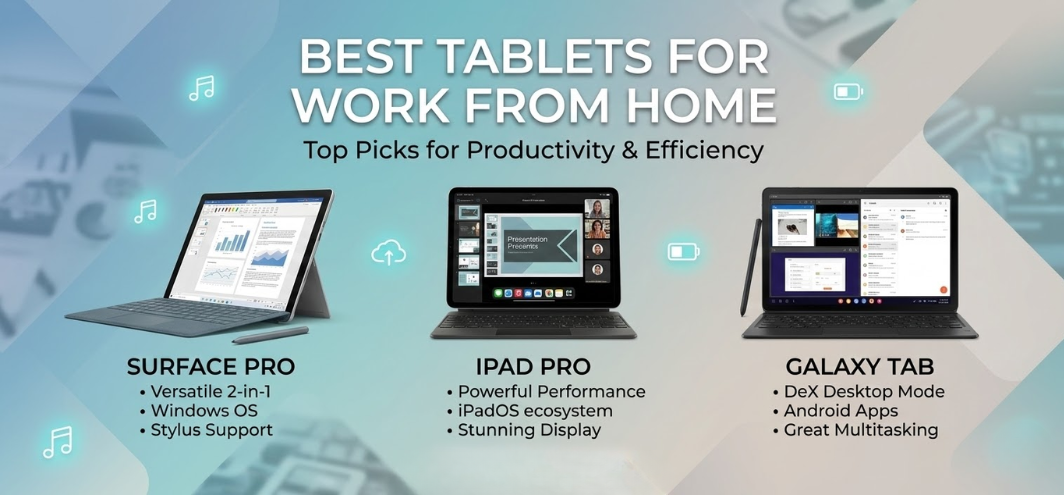
The rise of remote work has transformed how professionals operate, communicate, and collaborate. As modern workplaces continue shifting toward flexible environments, tablets have become powerful productivity tools capable of replacing traditional laptops for many tasks. With powerful processors, advanced operating systems, detachable keyboards, stylus support, and long battery life, today's tablets provide exceptional performance for work-from-home professionals.
In this comprehensive guide, we explore the best tablets for work from home in the US, highlighting devices that deliver high productivity, seamless multitasking, superior display quality, and professional-grade performance. Whether handling video meetings, document editing, design tasks, or project management, the tablets listed below offer efficient remote work solutions.
Why Tablets Are Perfect for Work From Home
Tablets have evolved into multi-functional work devices capable of handling demanding tasks while maintaining portability and convenience.
Key advantages of tablets for remote work include:
-
Lightweight and portable designs
-
Long battery life exceeding 10–15 hours
-
Touchscreen productivity and stylus compatibility
-
Seamless integration with cloud-based productivity tools
-
High-resolution displays for document review and video calls
-
Keyboard attachments for laptop-style workflow
These features make tablets ideal for remote professionals, freelancers, students, and digital entrepreneurs.
Top Tablets for Work From Home in the US
Below are the best tablets designed to maximize productivity for remote work environments, offering powerful hardware and versatile software ecosystems.
1. Apple iPad Pro (M4)
The Ultimate Tablet for Professional Remote Work
The Apple iPad Pro M4 stands as one of the most powerful tablets ever created, delivering desktop-class performance with Apple's advanced silicon.
Key Specifications
-
Apple M4 chip
-
11-inch and 13-inch Ultra Retina XDR display
-
Up to 2TB storage
-
Apple Pencil Pro compatibility
-
Magic Keyboard support
-
Thunderbolt connectivity
Performance for Work From Home
The iPad Pro delivers exceptional multitasking performance, enabling users to run demanding productivity applications such as:
-
Microsoft Office Suite
-
Google Workspace
-
Adobe Creative Cloud
-
Video conferencing platforms
With Stage Manager multitasking, professionals can run multiple apps simultaneously, making it ideal for project management, content creation, and business communication.
2. Samsung Galaxy Tab S9 Ultra
Large Display for Maximum Productivity
The Samsung Galaxy Tab S9 Ultra is a premium Android tablet designed for professionals who require large screen real estate and powerful multitasking capabilities.
Key Specifications
-
14.6-inch Dynamic AMOLED display
-
Snapdragon 8 Gen 2 processor
-
Up to 16GB RAM
-
S Pen included
-
DeX desktop mode
Performance for Remote Work
Samsung DeX transforms the tablet into a desktop-like interface, allowing users to manage multiple windows, drag-and-drop files, and use keyboard shortcuts.
This tablet excels in:
-
Spreadsheet management
-
Video editing
-
Creative design
-
Business presentations
3. Microsoft Surface Pro 10
Laptop-Level Productivity in a Tablet Form
The Microsoft Surface Pro 10 remains one of the most powerful work-from-home tablets, running the full Windows operating system.
Key Specifications
-
Intel Core Ultra processors
-
13-inch PixelSense touchscreen display
-
Up to 32GB RAM
-
Surface Slim Pen support
-
Detachable keyboard
Performance
Because it runs Windows 11, professionals can access full desktop applications such as:
-
Microsoft Excel
-
Adobe Photoshop
-
AutoCAD
-
Visual Studio
The Surface Pro offers true laptop replacement capabilities.
4. Apple iPad Air (M2)
Best Balance of Performance and Affordability
The iPad Air M2 offers powerful performance at a more accessible price point, making it a popular choice for remote workers and freelancers.
Key Specifications
-
Apple M2 chip
-
10.9-inch Liquid Retina display
-
Apple Pencil support
-
Magic Keyboard compatibility
Performance
The M2 processor ensures fast app performance, smooth multitasking, and excellent battery efficiency.
This tablet is ideal for:
-
Document editing
-
Video meetings
-
Digital note-taking
-
Content creation
5. Lenovo Tab P12 Pro
Affordable Productivity Tablet
The Lenovo Tab P12 Pro provides powerful performance at a competitive price, making it ideal for budget-conscious professionals.
Key Specifications
-
12.6-inch AMOLED display
-
Snapdragon 870 processor
-
Precision Pen 3 support
-
Keyboard compatibility
Performance
This tablet handles remote work tasks efficiently, including:
-
Email management
-
Document collaboration
-
Online meetings
-
Media presentations
Comparison Table: Best Tablets for Work From Home
| Tablet | Display | Processor | Battery Life | Best For |
|---|---|---|---|---|
| iPad Pro M4 | 13-inch | Apple M4 | 12 hours | Professional productivity |
| Galaxy Tab S9 Ultra | 14.6-inch | Snapdragon 8 Gen 2 | 14 hours | Multitasking |
| Surface Pro 10 | 13-inch | Intel Core Ultra | 13 hours | Windows users |
| iPad Air M2 | 10.9-inch | Apple M2 | 10 hours | Balanced performance |
| Lenovo Tab P12 Pro | 12.6-inch | Snapdragon 870 | 12 hours | Budget productivity |
Key Features to Look for in Work-From-Home Tablets
Selecting the right tablet requires evaluating several essential productivity features.
Processing Power
A powerful processor ensures smooth performance during multitasking.
Look for tablets equipped with:
-
Apple M-series chips
-
Snapdragon flagship processors
-
Intel Core processors
These processors enable efficient multitasking and demanding workloads.
Display Quality
Work-from-home professionals spend hours viewing documents and video calls. A high-quality display is essential.
Important display features include:
-
High resolution
-
Large screen size
-
Eye comfort technology
-
Brightness levels above 500 nits
Keyboard Compatibility
Productivity increases significantly when tablets support detachable keyboards.
Benefits include:
-
Faster typing
-
Laptop-like workflow
-
Efficient document editing
Stylus Support
Stylus compatibility allows users to:
-
Take handwritten notes
-
Annotate documents
-
Create digital sketches
-
Sign contracts digitally
Battery Life
Remote workers require devices that last through a full workday.
Look for tablets with 10–15 hours battery life.
Connectivity Options
Connectivity features enhance productivity.
Important options include:
-
Wi-Fi 6 or Wi-Fi 6E
-
Bluetooth 5.3
-
USB-C ports
-
5G cellular connectivity
These features enable fast data transfers and reliable internet access.
Best Tablets for Specific Remote Work Needs
Best Tablet for Video Meetings
Apple iPad Pro delivers excellent front cameras and microphones.
Best Tablet for Multitasking
Samsung Galaxy Tab S9 Ultra offers large displays and DeX mode.
Best Windows Tablet
Microsoft Surface Pro remains the best Windows productivity tablet.
Best Budget Tablet for Remote Work
Lenovo Tab P12 Pro provides excellent value for money.
How Tablets Improve Remote Work Efficiency
Tablets help professionals maintain productivity through several advantages.
Portability
Tablets are lightweight, making them easy to use anywhere in the home.
Touchscreen Interaction
Touch interfaces improve efficiency for:
-
Note-taking
-
Document review
-
Creative work
Cloud Integration
Most tablets integrate seamlessly with cloud services like:
-
Google Drive
-
Microsoft OneDrive
-
Dropbox
This allows instant file access from any location.
Future of Tablets in Remote Work
The next generation of tablets will introduce:
-
AI-powered productivity tools
-
Enhanced multitasking environments
-
Foldable display technology
-
Improved battery efficiency
These innovations will further strengthen tablets as primary remote work devices.
FAQs
1. What is the best tablet for work from home?
The Apple iPad Pro M4 offers the best combination of performance and productivity.
2. Can tablets replace laptops for remote work?
Yes. High-end tablets with keyboards can function as complete laptop replacements.
3. Which tablet is best for Microsoft Office?
The Microsoft Surface Pro runs the full Windows Office suite.
4. Are tablets good for video conferencing?
Yes. Most modern tablets feature high-quality cameras and microphones.
5. What screen size is best for remote work?
Tablets with 11–14 inch displays offer the best balance.
6. Do tablets support external keyboards?
Yes. Most productivity tablets support Bluetooth or detachable keyboards.
7. Are tablets suitable for multitasking?
Modern tablets support split-screen multitasking.
8. Which tablet has the longest battery life?
Samsung Galaxy Tab S9 Ultra provides up to 14 hours of usage.
9. Do tablets support external monitors?
Yes. Many tablets support USB-C display output.
10. Are tablets good for graphic design?
Yes, especially tablets with stylus support and high-resolution displays.
11. Can tablets run professional software?
Some tablets support full desktop applications.
12. Which tablet is best for freelancers?
The iPad Air M2 is ideal for freelancers.
13. Are Android tablets good for work?
Yes. Premium Android tablets offer strong productivity features.
14. Can tablets handle spreadsheets?
Yes. Apps like Excel and Google Sheets run smoothly.
15. Are tablets secure for business use?
Most tablets include advanced security features.
16. Do tablets support multitasking apps?
Yes. Many tablets allow multiple apps simultaneously.
17. Are tablets better than laptops for portability?
Yes. Tablets are significantly lighter and more compact.
18. Can tablets connect to printers?
Yes. Wireless printing is supported.
19. Do tablets support external storage?
Many tablets support cloud storage or USB drives.
20. Are tablets good for digital note-taking?
Stylus-enabled tablets are excellent for notes.
21. Can tablets be used for presentations?
Yes. Tablets easily connect to projectors or displays.
22. Do tablets support remote desktop apps?
Yes. Many tablets support remote access software.
23. Which tablet is best for multitasking?
Samsung Galaxy Tab S9 Ultra offers excellent multitasking capabilities.
24. Are tablets good for productivity apps?
Yes. Most tablets support major productivity tools.
25. Should remote workers buy tablets?
Yes. Tablets provide portable, powerful, and flexible work solutions.
For more information and to start using Deonus.com, visit our official website and download the app to stay updated on the best deals and offers. With Deonus.com, you can ensure that every shopping experience is not just an opportunity to shop but an opportunity to save big